 Memory Rolls
Wedding Photo Etiquette: A Guide for Couples and Guests
Wedding photo etiquette for guests and couples: when to shoot, when to put the phone away, when to post, and how to collect and share photos at low cost.
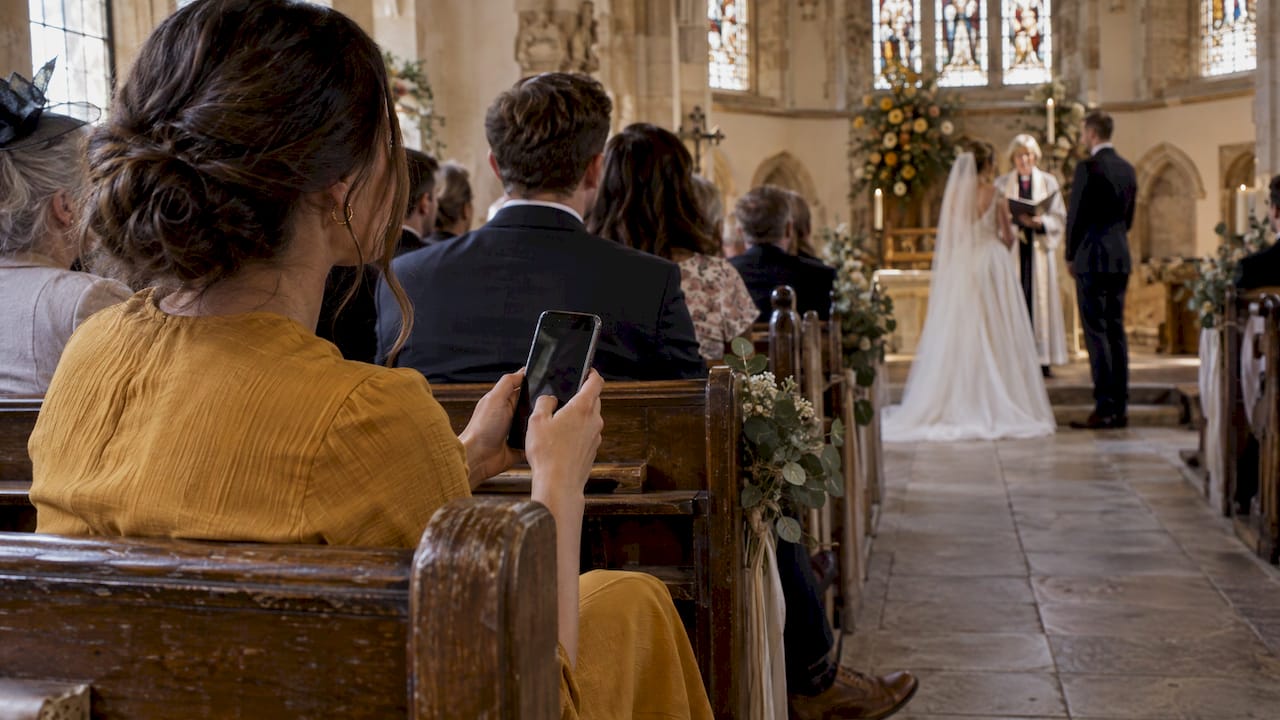
Good wedding photo etiquette comes down to three habits. Stay out of the professional photographer's way. Put your phone away when the couple asks. Wait for the couple to share the first photo before you post anything. Couples can make all three easy by telling guests the plan in advance and giving them one simple place to send their photos.
This guide covers both sides: what guests should do at each stage of the day, what couples can say to set expectations, and what it costs to gather guest photos in one album.
TL;DR
- Never step into the aisle or stand in front of the hired photographer. Stay seated during the ceremony and wait until formal portraits are done before taking your own.
- An unplugged ceremony covers the processional through the recessional only. Cocktail hour, dinner and dancing are fair game for guest photos.
- Guests should ask before posting photos of the newlyweds, and the couple should post the first picture unless they have invited guests to post.
- Couples can avoid awkwardness by announcing the rules, turning off flash at the right moments, and giving guests a single private place to upload.
- Collecting guest photos can cost very little. Our Event Camera pricing runs from free for the first five guests down to 20 ¢ per seat for large events.
Table of Contents
- Why guest photos need etiquette at all
- Etiquette for guests, moment by moment
- Posting online: what guests should wait for
- What couples can do to make etiquette easy
- Sharing guest photos while respecting privacy
- What it costs to collect and share guest photos
- Perspective
- Make guest photos easy with Event Camera
- Etiquette for the events around the wedding
- A short checklist
- FAQ
- Sources
Why guest photos need etiquette at all
Everyone at a wedding now carries a camera. That is good news for the couple, because guests catch things no hired photographer can: the grandfather wiping his eyes, the cousins mid-laugh at table six. It is also the reason etiquette matters. Fifty raised phones can block a view, ruin a posed shot or reveal the dress before the couple is ready.
Photographers who write for guests tend to say the same thing: the pro is working from a plan, and guests are there to take part. One UK photographer puts it plainly: guests are not there to act as secondary shooters, and being present often gives more meaningful memories than trying to capture every detail on a device.
The same photographers do not want guests to stop taking pictures. Emma Dodd-Carnine of Emma Lee Creative notes that personal photos from guests can be just as meaningful to the couple as the professional ones, and that following etiquette keeps vendors happy while guests still get the memories they want. The goal is the right photos at the right moments.
Etiquette for guests, moment by moment
Before the ceremony
Read the invitation and the wedding website. Many couples say there whether the ceremony is unplugged, whether there is a hashtag, and where to send photos. If there is no instruction, assume the couple would like you to hold off on posting until they have shared something first.
Arrive early enough to find a seat without wandering around the photographer's setup. Early arrivals are often when the pro is capturing the room, the flowers and the first guests, so keep your own shooting low-key.
During the ceremony
The rule here is simple: stay in your seat. Guests should never step into the aisle or block the professional, because movement and equipment can disrupt key moments. Leaning out for a better angle counts too. The aisle shot of the bride's entrance belongs to the photographer.
If the couple has asked for an unplugged ceremony, put every phone and camera away. In an unplugged ceremony guests put devices away from the processional through the recessional. It does not mean no phones for the entire day. If you are unsure, keep the phone in a pocket or bag until the recessional is over.
If the ceremony is not unplugged, shoot sparingly. Hold the phone low, silence it, skip the flash, and do not film the whole thing with your arms in the air. The person behind you wants to see the couple, not your screen.
During formal portraits
This is where guests most often cause problems without meaning to. When the photographer is posing family or the wedding party, guests who shoot at the same time pull the subjects' eyes in different directions. Emma Lee Creative describes the result as images where each subject is looking in at least two different directions. The fix is easy: wait until the photographer has finished, then ask whether you can take your own version.
Do not shoot over the photographer's shoulder, and do not call out to the couple to look at you. Let the pro direct the group.
At the reception
This is where guest photography shines. Cocktail hour, dinner, toasts, the first dance and the dance floor are all moments where a guest's phone is welcome. Even so, a few courtesies apply:
- Turn off flash. Beyond roughly 6 to 8 feet, flash illuminates nothing and creates a distracting white pulse, and it can wreck the photographer's exposure during toasts and the first dance.
- Stay out of the way during key moments. Cake cutting, the bouquet toss and the send-off are shots the pro has planned. Shoot from the side or behind them.
- Photograph people, not just the room. Candid shots of other guests are often what couples treasure most.
- Ask before photographing someone who looks uncomfortable. Children, and guests who have not agreed to be photographed, deserve a quick check with a parent or the person themselves.
If you need ideas for what to look for, our list of candid wedding photo ideas covers 25 moments worth catching.
Posing for family photos: who is in and who is out
A question that comes up constantly in wedding forums is what happens when the photographer calls for "family only" and you are a long-term partner who is not married in. The simplest approach: step aside cheerfully, find the couple's drink table or chat with other guests, and be ready to rejoin when the photographer calls everyone. Couples can head this off by giving the photographer a clear list and telling affected guests beforehand.
Posting online: what guests should wait for
The biggest etiquette trap is not at the wedding at all. It is the Instagram story at 6 p.m. on the wedding day.
Etiquette expert Diane Gottsman, quoted by Brides, says guests should ask before posting pictures of the newlyweds and that the couple should post the first picture, unless a wedding hashtag sign encourages guests to post. Weddingbee's guide for guests recommends waiting for the couple to reveal the first photo before posting anything, which can mean holding off a day or two.
In practice:
- Do not post the couple, the dress or the ceremony until the couple has posted or said it is fine.
- If there is a hashtag sign, follow its instructions, and still skip anything unflattering.
- Photos of yourself, the food or the venue décor are usually safe, but avoid tagging the couple's private details such as the exact location of a rehearsal dinner or a honeymoon destination.
- When in doubt, send your photos to the couple directly or to the shared album, and let them decide what goes public.
What couples can do to make etiquette easy
Most guest mistakes come from not knowing the plan. A few small steps remove nearly all the friction.
Decide what you want, then say it
There are three common stances: fully unplugged for the day, unplugged for the ceremony only, or phones welcome throughout. All are fine. The only mistake is not saying which one you chose. Put it on your wedding website, add a line to the program, and consider a sign at the ceremony entrance.
The most effective step is a spoken one. A short announcement from the officiant before the processional takes about 15 seconds and dramatically increases compliance. Keep it warm, not scolding: you want guests present, and you will share photos afterward.
Brief the photographer and the guests together
Tell your photographer if you have an unplugged ceremony or a no-flash request, and share the shot list so guests know when formal portraits happen. Many couples schedule a clear window for family portraits and announce it, so relatives are ready rather than wandering off.
Tell guests where photos should go
Guests will take photos either way. If you do not give them a destination, you will end up chasing pictures across texts, group chats and social feeds. Say on the website and the program where to send photos, and say when you hope to have them. This is also the cleanest way to handle privacy, because a private album means guests are not tempted to post for you.
You have several ways to gather those pictures, and we compare them in how to collect photos from wedding guests. Whatever you pick, favor the one that asks guests to do the least. Requiring an app download or account is where most guest participation drops off, as we explain in our piece on wedding photo sharing without an app.
Sharing guest photos while respecting privacy
A shared album raises etiquette questions of its own. Who can see the pictures? Who can add to them? Who decides what stays?
A few principles keep things comfortable:
- Keep it private. Share access through a QR code or link given only to guests, rather than a public page.
- Let the couple or organizer curate. Not every photo is a keeper, and the couple should be able to choose what the group sees.
- Limit the volume. Capping the number of shots per guest keeps the album from becoming 4,000 near-identical blurry dance-floor photos.
- Set an end date. Tell guests how long the album stays available so they can download what they want.
This is the model we built Event Camera around. Guests scan a QR code, shoot a limited number of photos from their own phones, and the organizer curates the best into a shared private album. Photos are kept for 90 days.
What it costs to collect and share guest photos

Cost is the other thing couples ask about. Prices depend on how many guests you invite and who pays. As a general pattern, a free shared folder costs nothing but relies on guests remembering to upload. Dedicated services charge by guest count, by event, or by subscription. Check each provider's own pricing page for current numbers, since these change.
Here is how our pricing works at Event Camera. It is pay-per-event, with no subscription, and based on the number of seats. We describe the first five guests as free. After that, these are the published rates from our pricing page:
| Seats | Price per seat (one-off) |
|---|---|
| 1–5 | Free to start |
| 6–25 | $1 |
| 26–100 | 40 ¢ |
| 101–250 | 30 ¢ |
| 251 and up | 20 ¢ |
Two other options give couples control over who pays:
- Guest codes: $1 one-off per seat, useful when you want to hand specific people access.
- Guest-paid event seat: $1.99 one-off per person, for events where each guest covers their own seat.
The price rises with guest count, but the per-seat rate falls as the event gets larger. Confirm the final total at checkout, where seats are priced for your event.
Perspective
We built Event Camera because we kept seeing the same thing at weddings: the professional photos were beautiful, and the guest photos were scattered across a dozen phones, never to be seen again.
The etiquette problem and the memory problem have the same answer. When guests have a simple, sanctioned way to take pictures, they stop hovering behind the photographer, stop wondering whether they should post, and stop feeling that they have to document everything. A limited number of shots per guest nudges people to choose the moments that matter and then get back to the party.
No app download and no account means a grandmother can join as easily as a college roommate. The organizer curates the album, so the couple decides what is shared, and private access means nobody has to guess what is okay to post. We think that is what good wedding photo etiquette looks like in practice: everyone participates, and the couple stays in charge.
Uday
Make guest photos easy with Event Camera
If you want guests to share their view of the day without blocking the photographer or posting early, give them a QR code on the table or the program. They scan, shoot their limited set of photos and short videos, and you pick the best for the shared album. There is nothing to install and no account to create.

See how it works for weddings on our wedding page, or check the per-seat pricing to see what your guest count would cost. If you are still choosing a format, our comparison of wedding photo booth alternatives and our look at disposable cameras on tables versus a camera on guests' phones can help.
Etiquette for the events around the wedding
The same principles apply before and after the big day. At the rehearsal dinner, the couple's family often wants a relaxed record without a hired photographer, so guest photos matter even more. Our rehearsal dinner photo ideas show what to capture. For the bachelorette weekend, agree as a group before posting, since not everyone wants the party on social media. We cover this in bachelorette party photo ideas.
If you want to turn photo-taking into something playful rather than a free-for-all, a wedding photo scavenger hunt gives guests prompts that point them toward moments the pro will not catch.
A short checklist
For guests
- Stay seated at the ceremony and out of the aisle.
- Put your phone away if the couple has asked for an unplugged ceremony.
- Wait for the photographer to finish before taking your own portrait.
- Turn off flash.
- Do not post the couple until they have posted or said yes.
For couples
- Choose a phone policy and put it on the website and the program.
- Ask the officiant to make a short announcement before the processional.
- Share the portrait schedule and family list with guests and the photographer.
- Give guests one private place to send photos, and say when you will share the album.
FAQ
Is it rude to take photos at a wedding when there is a professional photographer?
No, as long as you do not get in the way. Guests can take photos at the reception and during informal moments, but should stay seated during the ceremony, avoid the aisle and wait until formal portraits are done. Personal photos often become some of the couple's favorites.
When can wedding guests post photos on social media?
Wait until the couple has posted first, or until they have told you it is fine. If there is a wedding hashtag sign inviting posts, you can follow it. Otherwise, ask before posting photos of the newlyweds, and expect that the couple may not share anything for a day or two.
What does an unplugged ceremony mean?
Guests put away phones and cameras from the processional to the recessional. It does not apply to the whole day, so cocktail hour, the reception and dancing are still open for guest photos. A short announcement from the officiant before the ceremony helps guests remember.
How much does it cost to collect wedding photos from guests?
It depends on your guest count and the method. With Event Camera, the first five guests are free, seats 6 to 25 are $1 each, and the per-seat price drops to 40 ¢, 30 ¢ and 20 ¢ as the guest count grows. Guests can also pay for their own seat at $1.99 each. See the pricing page for details.
How can couples keep guest photos private?
Share a private link or QR code only with guests, rather than a public page, and curate the album so you decide what everyone sees. Ask guests to hold off on posting until you have shared your own photos.
Sources
- Wedding Photography Etiquette for Every Guest
- Emma Lee Creative: Capturing the Moment, Etiquette for Wedding Guests
- Brides: 3 Rules for Posting Wedding Pictures After the Big Event
- Weddingbee: Social Media Etiquette for Wedding Guests
- Plan A Wedding: Unplugged Wedding Ceremony Guide
- Wedding Guest Photography Etiquette: A Photographer's Guide