 Memory Rolls
Branded QR Code Photos: How to Brand Your Event Album
Put your logo and colors on a QR code that opens a guest photo page. Learn what to brand, how to keep it scannable, and how to protect guest privacy.
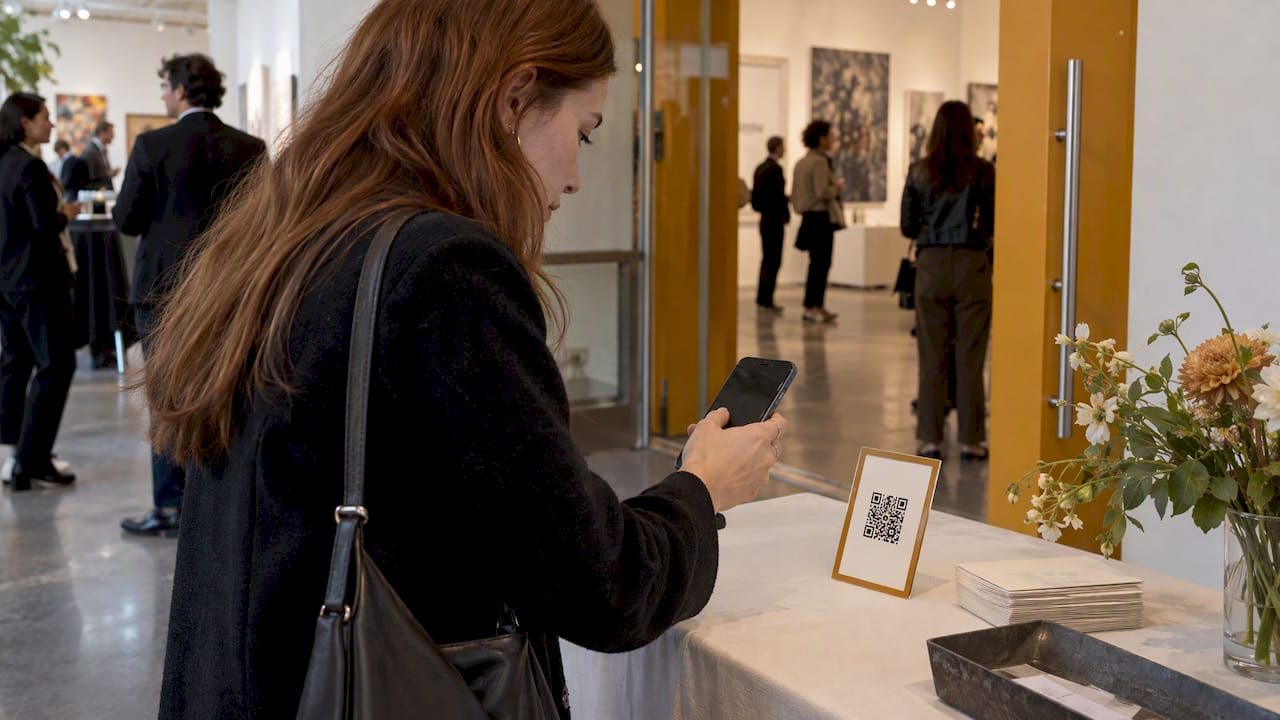
A branded QR code photo setup has two parts: a QR code that carries your logo and colors, and the photo page it opens. Most guides only cover the first part. Guests judge the second part, because that is where they take, upload or view pictures. Brand both, test the code on real phones, and pick a photo tool that needs no app or account from guests.
TL;DR
- Branding a QR code means a logo, brand colors and a short call to action, all kept simple enough to scan from several feet away.
- The page behind the code matters as much as the code. Guests should land in a camera or album in one tap, with no app download and no sign-up.
- Use high error correction, strong contrast and a printed fallback so branding never costs you a scan.
- Check what the page collects, how long it keeps it and who can see it before you put a code in front of guests.
- With Memory Rolls Event Camera, each guest scans a code and takes a limited number of photos from their own phone, and you curate the shared album.
Table of Contents
- What "branded QR code photos" really means
- How to add a logo and colors to a QR code
- Keep it scannable: a practical checklist
- What the page behind the code should do
- Branded versus white-label: what to ask a provider
- Branded photo sharing by event type
- Privacy and security: brand the code, but earn the trust
- Set up a branded guest camera with Memory Rolls
- A simple rollout plan
- Common mistakes to avoid
- FAQ
- Sources
What "branded QR code photos" really means
People search this phrase for three different jobs, and it helps to separate them.
- A QR code that looks like your brand. Your logo in the center, your colors, a frame with a few words such as "Scan to share your photos."
- A QR code that opens a photo page that looks like your brand. The guest scans, and the page carries your name, your event title and your colors.
- A white-label photo experience. The guest sees your event, not the software vendor's name, from the sign to the album.
The first job is a design task. The second and third are product questions. If you only do the first, you get a nice-looking square that sends guests to a generic page, and the brand impression breaks the moment they scan.
A dynamic code, one that points to a short redirect you control, adds flexibility. Bitly's guide to event photo QR codes notes that dynamic codes can send people to an updated gallery without replacing printed materials and can report scan activity. That is useful if your album link changes after the event, for example from a live upload page to a finished gallery.
How to add a logo and colors to a QR code
The process is the same whichever generator you use.
- Start from the right URL. Use the link to the guest photo page or event album, not a link to a homepage. Confirm it opens on a phone before you design anything.
- Add your logo in the center. Keep it small and simple. A wordmark with fine lettering turns to mush at small sizes, so a monogram or icon often works better.
- Set your colors. Dark modules on a light background scan best. Light dots on a dark background can fail on some scanners.
- Add a frame and a call to action. A few words such as "Scan to add your photos" tell guests what happens next, so they do not wonder whether the code is a menu or an ad.
- Export for the medium. Bitly's guide says organizers can export as JPEG, SVG or PNG. Use vector SVG for print and PNG for screens.
- Test it. Scan it from an iPhone and an Android phone, in dim light, from a few feet away, and from the printed proof, not just the screen.
The KickoffLabs documentation for page QR codes shows the same pattern: brand colors, an optional center logo on higher plans, PNG for screens and SVG for print. It also shows a useful principle. The tool substitutes a darker brand color when an accent color is too light to scan reliably, so the design never undermines the function. Do that check yourself if your generator does not.
Why a logo does not break the code
QR codes use Reed-Solomon error correction, which lets a scanner rebuild the data even when part of the symbol is damaged or covered, as this overview of the format explains. A center logo covers part of the symbol, and error correction is what covers for it. Choose the highest correction level your generator offers when you add a logo. The tradeoff is a denser pattern, so keep the link short, which also makes the dots larger and easier to read.
Keep it scannable: a practical checklist
Branding fails when guests cannot scan. Run through these before anything goes to print.
- Contrast. Dark on light, with a clear gap between the pattern and the background. Avoid gradients that wash out the modules.
- Quiet zone. Leave a blank margin around the code. Do not let a frame, a border or a table decoration touch the pattern.
- Size. Bigger for greater distance. A code on a table card can be small. A code on a banner behind the bar needs to be large enough to scan from where guests stand.
- Logo size. Keep the logo to a small share of the center. If the code scans slowly, shrink the logo first.
- Matte finish. Glossy signs reflect lights and camera flashes. Matte stock is safer.
- Placement. Eye level, near where guests wait or sit: the entrance, the bar, the table, the photo wall. Never behind a centerpiece.
- A fallback. Print a short URL under the code, or give the code in your welcome text, for the guest whose camera will not cooperate.
For wedding-specific wording and sign placement, we wrote a separate guide on QR code signs for wedding photos.
What the page behind the code should do
This is where most branded QR code setups lose people. The code scans fine, then the guest hits an app store prompt, a sign-up wall or a cluttered upload form. At a party, where people have a drink in one hand and a few seconds of attention, every extra step costs you photos.
A good guest photo page does the following:
- Opens in the phone's browser. No app to install, no account to create.
- Tells guests what they can do. Take a photo, see how many shots they have left, and nothing else to figure out.
- Carries your branding. Event name, your logo, your colors, so it feels like part of the event.
- Sets limits that fit the event. A limited number of shots per guest keeps people choosing their moments, like a disposable camera did.
- Lets you review before you share. You decide which photos go into the shared album.
- Works for all ages. The grandparent at table four should succeed on the first try.
We have written about why skipping the app matters in detail in wedding photo sharing without an app, and about the full setup in how to set up QR code photo sharing for any event.
Branded versus white-label: what to ask a provider
"White label" gets used loosely. Before you commit to a tool, ask these questions, because the answers change what your guests see.
| Question | Why it matters |
|---|---|
| Can I add my logo and event name to the guest page? | Guests should recognize the event, not a stranger's product. |
| Does the QR code itself carry my branding? | A branded code builds trust and invites scans. |
| Do guests need an app or an account? | Every barrier cuts participation. |
| Who controls the album, and can I curate it? | You protect the look of the final gallery. |
| How long are photos kept, and can I download them in bulk? | You need to know when files disappear and how to keep them. |
| Who pays: host or guests? | It changes your budget and your sign-up flow. |
The corporate and brand-activation case is the most demanding one. A sponsor wants its name on the signage, the page and the album, and wants every attendee to reach the page quickly. If that is your event, see our page for branded disposable cameras for brand activations.
Branded photo sharing by event type
Weddings
Couples usually want a soft, personal look: initials or a monogram, the wedding date, and colors from the invitation suite. The sign matters more than the code's logo. A short line such as "Scan and take your shots" on a table card, plus a mention from the DJ or officiant, does more than any design detail. Our guide on one album from all wedding guest photos covers how to merge everything afterward. If you are still weighing options, six ways to collect photos from wedding guests compares them side by side.

Corporate events and conferences
Here the logo, the event hashtag and the sponsor lockup are the point. Put the code on lanyards, session room screens and the registration desk. Photos from many rooms can end up in one album, which is how marketing teams get candid shots without a photographer in every session. See conference photo sharing for attendees and our corporate events page.
Venues, bars and clubs
A venue can put a permanent branded code on tables, menus or walls so every night produces guest photos that carry its name. Read more on our venues and nightlife page.
Campus groups, races and fitness events
Student organizations and race organizers want volume and speed. A banner at the start line or the chapter house, a short call to action and a limit on shots per person keeps the album tidy. See our pages for campus groups and races and fitness events.
Birthdays and private parties
Smaller gatherings do not need much design work. A simple printed code on the table and a note in the group invitation are enough. Our guide on getting photos from everyone at a party shows how.
Privacy and security: brand the code, but earn the trust
A QR code hides its destination. That is convenient, and it is also why scammers like them. The Federal Trade Commission has warned that QR codes can lead to spoofed sites, credential theft or malware, and advises people to inspect the destination URL before opening it and to be wary of unexpected codes in texts or emails.
For an organizer, that has practical consequences:
- Branding builds trust, so protect it. Print the code on materials you control. Do not let guests find a sticker pasted over your sign.
- Use a link that looks right. A readable domain tells careful guests where they are going. Say in your invitation or welcome message that a photo code will be on the tables.
- Never ask for passwords or payment on a guest photo page. If a guest sees a login prompt, they should be suspicious.
- Limit what you collect. A photo page should need nothing more than the photo itself.
The FTC's guidance for organizations that handle consumer data points the same way. In a 2023 speech, FTC Chair Sam Levine said companies should assess what they collect, how they collect it, the uses they promise, retention and third-party sharing. The FTC's privacy-by-design statement describes limiting collection and retention to what is necessary and giving people meaningful choices. As an event host, that translates into plain questions for any photo tool: what does it collect from guests, how long does it keep photos, who can see the album and does it share files with anyone else?
Tell guests about photography in plain words. A line on the sign or invitation such as "Photos you take will go into a private album the hosts review" sets expectations. If your event has children, or a venue with its own photo rules, check them before you launch.
Our view on branding event photo codes
We built Event Camera around a simple idea: the code is the doorway, and the doorway should be easy to walk through. A beautiful code that sends guests to an app store or a sign-up form defeats its own purpose.
So we focus on what happens after the scan. Guests open a camera in their phone's browser, take their shots, and that is it. No download, no account. Organizers can brand the experience for the event, decide who pays and how many shots each guest gets, and curate the album before it is shared. We think that mix of branding, limits and curation is what turns a pile of phone photos into an album people actually want to open.
Our advice is to treat the code as part of the event design, not an afterthought. Put it where guests already are, tell them why they should scan, and keep the experience so light that nobody needs instructions.
Uday
Set up a branded guest camera with Memory Rolls
Event Camera turns a QR code into a disposable camera on every guest's phone. Each guest takes a limited number of photos and short videos from their own perspective, and you choose the best shots for the shared album. It works for weddings, corporate events, brand activations, venues, student groups and fitness events, and you can customize it with your branding.
Pricing is per event and based on the number of seats, with no subscription. It is free for the first five guests, and above that you pay once per seat.

See the full list on the pricing page, or start from the Event Camera homepage. If you are weighing it against other kinds of tools, our comparison page lays it out.
What it costs
The published per-seat prices fall as the guest count grows:
| Seats | Price |
|---|---|
| 1 to 5 | Free |
| 6 to 25 | $1 per seat, one-off |
| 26 to 100 | $0.40 per seat, one-off |
| 101 to 250 | $0.30 per seat, one-off |
| 251 and up | $0.20 per seat, one-off |
| Guest codes | $1 per seat, one-off |
| Guest-paid event seat | $1.99 per person, one-off |
The host-paid and guest-paid options let you decide who covers the cost. Photos are kept for 90 days, and you can download them in bulk, so plan to save your album soon after the event. Prices are as published on our site; check the pricing page for the current figures. If free tools are on your shortlist, our piece on free event photo sharing explains what they do well and where they stop.
A simple rollout plan
Two weeks before. Choose your photo tool, set the shots-per-guest limit and add your branding. Generate the code and print a proof.
One week before. Test the printed proof on several phones, in the light of the actual venue if you can. Order signs, table cards or banners in a matte finish.
Day of. Place codes at the entrance, bar and tables. Have a host, emcee or staff member mention the code once early and once again later. Keep a spare printed code in your bag.
After the event. Review submissions, pick the best shots for the shared album and send the link to guests. Download the full set in bulk before the retention window ends. The QR code photo album guide walks through collecting every guest's photos.
Common mistakes to avoid
- Linking the code to a homepage. Send guests straight to the camera or upload page.
- Over-designing. Dots in pastel colors and a huge logo look elegant on a mockup and fail in a dim room.
- Printing only on screens. Screens flicker in photos and glare under lights. Print a physical backup.
- No call to action. A bare code makes guests guess. Three words fix that.
- Changing the destination late. If you print a static code, the link is locked in. Use a redirect you control if the page might change.
- Forgetting the aftermath. Decide before the event who curates, when the album goes out and where the bulk download is saved.
FAQ
Can I add my logo to a QR code without breaking it?
Yes. QR codes use error correction, so a small logo in the center does not stop scanners from reading them. Set the highest error correction level, keep the logo small, use dark modules on a light background and test the printed version on several phones.
What does white-label photo sharing mean?
It means guests see your event or company branding rather than the software provider's. That can include the QR code design, the guest page and the album. Ask any provider exactly which of those you can brand before you buy.
Do guests need to download an app to use a QR code photo camera?
Not with Event Camera. Guests scan the code and the camera opens in their phone's browser, with no app download or account. Each guest gets a limited number of shots, and you curate the shared album.
Should I use a static or dynamic QR code?
A static code is fixed to one link, which is fine if your photo page will not change. A dynamic code points to a redirect you can update, so the same printed code can lead to a finished gallery later. Dynamic codes can also report scans, as Bitly's event photo guide describes.
How do I know a QR code is safe to scan?
Check the URL your phone shows before you open it, and be wary of codes you were not expecting, as the FTC's consumer alert advises. As a host, print codes yourself and tell guests where to expect them.
Sources
- How Businesses Share Event Photos with QR Codes (Bitly)
- Share your page with a QR code (KickoffLabs Docs)
- QR code (Wikipedia)
- Scammers hide harmful links in QR codes (FTC Consumer Alert)
- 2023 Consumer Data Industry Association Law & Industry speech (FTC)
- Federal Trade Commission privacy statement (FTC)