 Memory Rolls
Attendee Engagement Photos: 12 Ways to Get Guests Shooting
Attendee engagement photos start with a reason to shoot. Learn how scavenger hunts, shot limits and one shared album get more guests taking part.
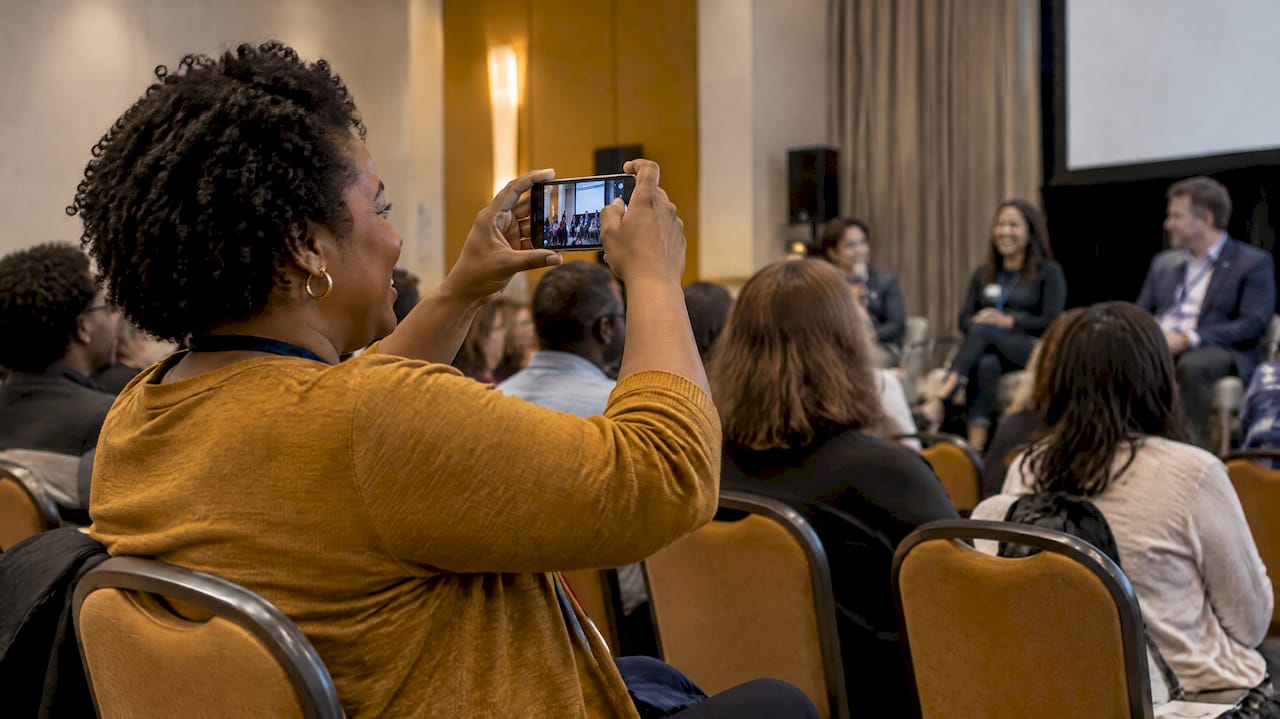
Attendee engagement photos are pictures your guests take themselves, and they work best when guests have a reason to take them. Give people a simple prompt, a small shot limit and one place to send everything, and most will join in. A camera in the room does not do that on its own. This guide covers the prompts, the logistics, the privacy basics and the follow-up that turn a quiet crowd into a set of photos you want to keep.
TL;DR
- Guests take photos when they have something to do. A prompt, a game or a limited number of shots beats "please share your pictures."
- Use one QR code, repeated on programs, badges, table tents and slides, and have the MC mention it once.
- Scavenger-hunt style prompts are the easiest way to get shy guests involved. Fifteen to twenty prompts is plenty.
- Curate before you share, and check permissions before you publish anything publicly.
- With Event Camera, guests scan a code and shoot from their own phones with no app and no account. The first five guests are free.
Table of Contents
- What attendee engagement photos actually are
- Why a camera in the room is not enough
- Photo scavenger hunt ideas that work
- Make the QR code impossible to miss
- Collect, curate and display the photos
- Privacy, permissions and accessibility
- Our perspective: engagement is designed, not hoped for
- What it costs to run guest photos with Event Camera
- A simple plan for your next event
- FAQ
- Sources
What attendee engagement photos actually are
The phrase gets mixed up with couples' engagement shoots, so to be clear: this is about photos and short videos taken by the people attending your event, whether that is a wedding, a conference, a brand activation or a company party. They are a way to involve attendees in telling the story of the event, not only to record it.
There is a practical reason to want them. Enloe Entertainment, an event company, describes guest photo experiences as adding candid, energetic and personal perspectives while involving attendees in the event's story. The same guidance treats guest images as a complement to professional coverage: the professional documents the event from the outside, and guests contribute what it felt like from inside.
That difference shows up in the pictures. A hired photographer will get the first dance, the keynote and the group shot. Guests get the friend laughing so hard she can't finish the toast, the back of the room during the panel, the sticky dessert table at 10 p.m. Those are the images people actually forward.

Why a camera in the room is not enough
Most events that ask guests for photos get a handful. The usual mistake is treating photo sharing as a favor: a line in the program saying "post with our hashtag" or "upload to the folder." It asks guests to download something, remember a tag, find a link and decide what is worth sending.
Enloe's guidance makes the same point from the other direction: the strongest guest-photo experiences are designed as participation, with something to do and a reason to take part, rather than just placing a camera in the room. So the question to ask is not "how do we get photos?" but "what are we asking people to do?"
Three things make the ask easy:
- No friction. Every step before the first photo (an app store, a password, a form) loses people. A QR code that opens a camera in the phone's browser removes most of that.
- A clear limit. "You get 12 shots" feels like a game. "Take as many as you like" feels like homework. Limits make guests choose their moments, which is the idea behind disposable cameras.
- A reason. A prompt, a prize, a reveal or a shared album that everyone will see later.
Photo scavenger hunt ideas that work
A photo scavenger hunt is the most reliable engagement mechanic because it gives hesitant guests permission to walk up to strangers. Instead of "take some photos," the instruction becomes "find someone wearing blue and get a selfie." Keep the list short, specific and a little silly. Fifteen to twenty prompts, printed on a card or shown on a slide with the QR code, is enough for an evening.
Wedding prompts
- A selfie with someone you met today
- The best dance move you can catch
- Someone from the bride's side and someone from the groom's side, together
- The oldest and youngest guest at your table
- A toast from an unusual angle (a glass, a shoe, a centerpiece)
- The most dressed-up person on the dance floor
- Something that made you laugh during the ceremony
- A photo of the couple they don't know you took
If you want more on wording the sign and where to put it, our guide to wedding QR code sign wording has samples. For the album side, see how to make one album from all your wedding guest photos.
Corporate and conference prompts
- A selfie with someone from a different department
- The most useful slide in a session (not the speaker's face)
- Your coffee-line crew
- A photo of someone doing something that shows your company values
- The booth with the best giveaway
- Your team doing a ridiculous group pose
- A "before and after" of the room at setup and at the busiest moment
Team events respond best to prompts that cross groups, since the people who already know each other will find each other anyway. More on this in our piece on corporate event engagement ideas, and for holiday parties, company holiday party photo ideas.
Brand activations, campus and fitness events
- Brand activation: a prompt that fits the product ("show us your morning routine") plus a branded album gives you content that looks like customers, not ads. Our brand activations page covers how branding works on the camera.
- Campus events: prompts tied to traditions, houses or rivalries. Student groups tend to love a leaderboard-style hunt.
- Races and fitness events: the start line, the hardest hill, the person cheering at mile 8, the post-finish slump. Participants rarely have a hand free to shoot mid-race, so aim prompts at before and after.
Rules that keep a hunt fun
- Make prompts about people and moments, not about finding objects, so the photos are worth keeping.
- Mix easy and hard. If every prompt takes effort, people quit after three.
- Keep the prize small. A round of drinks or a gift card for the funniest album entry is enough.
- Announce it once, at a moment when people are seated and listening, such as dinner or a break between sessions.
Make the QR code impossible to miss
One QR code, shown in many places, outperforms several different ways to join. Event-planning guidance recommends putting the same code on programs, menus, badges, table tents, entry signs and slides, then having the MC mention it once. The repetition is the point: a guest who ignores it at the door will see it again at the table.
A few practical details:
- Print the code large enough to scan from an arm's length, and put a short line of text beside it saying what happens next ("Scan to take your 10 shots").
- Place codes where people wait: bar lines, registration, restrooms, charging stations.
- Put the code on the second screen of a slide deck, not only the first, so late arrivals see it.
- Test the code on both iPhone and Android before the event, on venue Wi-Fi and on cellular.
The full setup is walked through in QR code photo sharing: how to set it up for any event.
Collect, curate and display the photos
Collecting is the easy part. What makes the photos feel like part of the event is what you do with them.
Collect in one place
Photos scattered across text threads, social tags and cloud folders are photos nobody sees. Send every guest to the same destination. A QR-based album does this by design, and our guide to a QR code photo album explains how to gather every guest's shots without chasing people afterward.
Curate before you share
Not every shot belongs in the final set. Blurry frames, duplicates and the occasional photo someone would rather not see should go before the album does. Curation also makes the set better: 150 good photos get opened, 1,500 mixed ones do not. With Event Camera, the organizer picks which photos go into the shared album, so guests see the best of the event rather than the raw feed.

Display during the event, if it fits
A slideshow on a lobby screen or a stage-side monitor tells guests that their photos matter, and that draws more photos. It only works if you moderate. Decide in advance who watches the feed and what gets pulled. For conferences, the options differ by room and session; see conference photo sharing for attendees.
Deliver after the event
Send the album within a few days, while guests still remember the night. Tell them how long it stays available. With Event Camera, photos are kept for 90 days and can be downloaded in bulk, so the organizer should save the final set well before that window closes.
Privacy, permissions and accessibility
A guest album is private by default in the sense that only people with the link can see it, but the moment you move photos onto a website, social channel or promotional material, the rules change.
- Rights beyond copyright. The Professional Photographers of America notes that even when you own the copyright, rights of publicity, privacy and trademarks can limit how an image may be used. A photo with a recognizable person or logo in it is not automatically free for ad use.
- Releases. Model releases are the tool for getting permission to use someone's likeness in particular ways, and property releases may be appropriate for recognizable private property, especially for public-facing uses, according to PPA. If you plan to use guest photos in marketing, say so up front (in the invitation, registration form or sign next to the QR code) and get that consent before publishing.
- Credit and disclosure. Event-planning guidance advises that before publishing attendee photos you check permissions, credit contributors and disclose material connections, for example when a sponsor is involved.
- Weddings and private parties. Keep the album to guests. Ask the couple or host before posting any photo of a minor or of someone who has asked not to be shared.
- Accessibility. Add alt text or short descriptions when you publish selected photos on a website or social post, and caption any video clips you share. Some guests will also find the camera easier to use on a larger screen or with assistive features, so keep instructions plain and the code scannable from a distance.
If legal questions come up for a commercial use, such as a brand campaign built on attendee images, ask an attorney who handles media or advertising law before you publish. This guide is not legal advice.
Our perspective: engagement is designed, not hoped for
We built Event Camera around one observation: people take better, more candid photos when the camera is light, the limit is small and the effort is almost nothing. A guest who has to install an app or make an account will not do it between the bar and the dance floor. A guest who scans a code and has 10 shots to use will.
That is why guests on Event Camera use their own phones with no download and no account, and why organizers decide how many shots each person gets. The limit is a feature. It nudges people to look around for the moment that is worth a frame, which is the reason disposable cameras produced such good party pictures in the first place.
We also think the organizer should stay in control of what is shared. Guests contribute, the organizer curates, and the final album reflects the event as the host wants it remembered. And we price it per event, not per month, because most hosts run one wedding or one conference and do not want a subscription for it.
Our advice is simple: pick a prompt, pick a limit, show the code three times, and send the album fast.
— Uday
What it costs to run guest photos with Event Camera
Event Camera is priced per event by the number of seats, with no subscription. The first five guests are free. After that, one-off pricing per seat is published on the pricing page:
| Seats | Price per seat (one-off) |
|---|---|
| 1 to 5 | Free |
| 6 to 25 | $1 |
| 26 to 100 | 40¢ |
| 101 to 250 | 30¢ |
| 251 and up | 20¢ |
Two other options are worth knowing. Guest codes are $1 per seat, and a guest-paid event seat is $1.99 per person, for events where attendees cover their own access. The host chooses who pays and how many shots each guest gets.
For a 100-person wedding, that works out to the first five free, 20 seats at $1 and 75 seats at 40¢. For specific event types, see our pages for weddings, conferences and off-sites, campus groups, venues and nightlife and races and fitness events.
Ready to try it? Set up your Event Camera and test it with your own team before the event.

A simple plan for your next event
Here is a plan that fits most events, from a 40-person rehearsal dinner to a 400-person conference.
- Two weeks out: choose your shot limit (10 to 15 suits most events) and write 15 to 20 prompts.
- One week out: design the sign and the slide, and decide who curates and when.
- The day before: test the QR code on two phones, on venue Wi-Fi and on cellular.
- At the event: place the code at entry, on tables, on a slide and on any printed program. The MC mentions it once, at dinner or the first break.
- During: if you run a live display, assign one person to watch it.
- Within a week after: curate, share the album, and tell guests how long it remains available.
- Before the storage window closes: download the full set in bulk and keep your own copy.
FAQ
How many photos should each guest be allowed to take?
Ten to fifteen works for most events. It is enough to capture a few real moments and small enough to make each one count. For long events such as multi-day conferences or festivals, a higher limit makes sense. With Event Camera, the host sets the number.
Do guests need to download an app to share photos?
Not with Event Camera. Guests scan a QR code and take photos from their phone's browser, without an app or an account. Fewer steps mean more guests actually join in, particularly older guests and people who are only attending for an hour.
Can I use guest photos in my marketing?
Only with the right permissions. Copyright is not the only issue: rights of publicity, privacy and trademarks can also apply. Tell guests in advance how photos may be used, get consent where needed, and speak to a media attorney for a paid campaign.
Should I still hire a professional photographer?
For key moments, yes. Professional coverage and guest photos do different jobs: the professional documents the event from the outside, and guests add the candid, personal angle. Using both gives you the polished record and the real one.
How long do guests have access to the photos?
With Event Camera, photos are retained for 90 days. Download the full set in bulk before then if you want to keep it permanently.
Sources
- Event Memory Capture Explained for Event Hosts, Enloe Entertainment
- Event Photo Strategy: Avoid Common Mistakes and Enhance Your Event, Resident
- Photography Image Usage Rights and Licensing, PPA
- Photography Contract Templates: Protect Your Business, PPA