 Memory Rolls
Event Recap Video: How to Plan, Film and Edit One
Learn what an event recap video is, how long it should run, what to film and how to edit it, plus how guest phone footage fills the gaps.
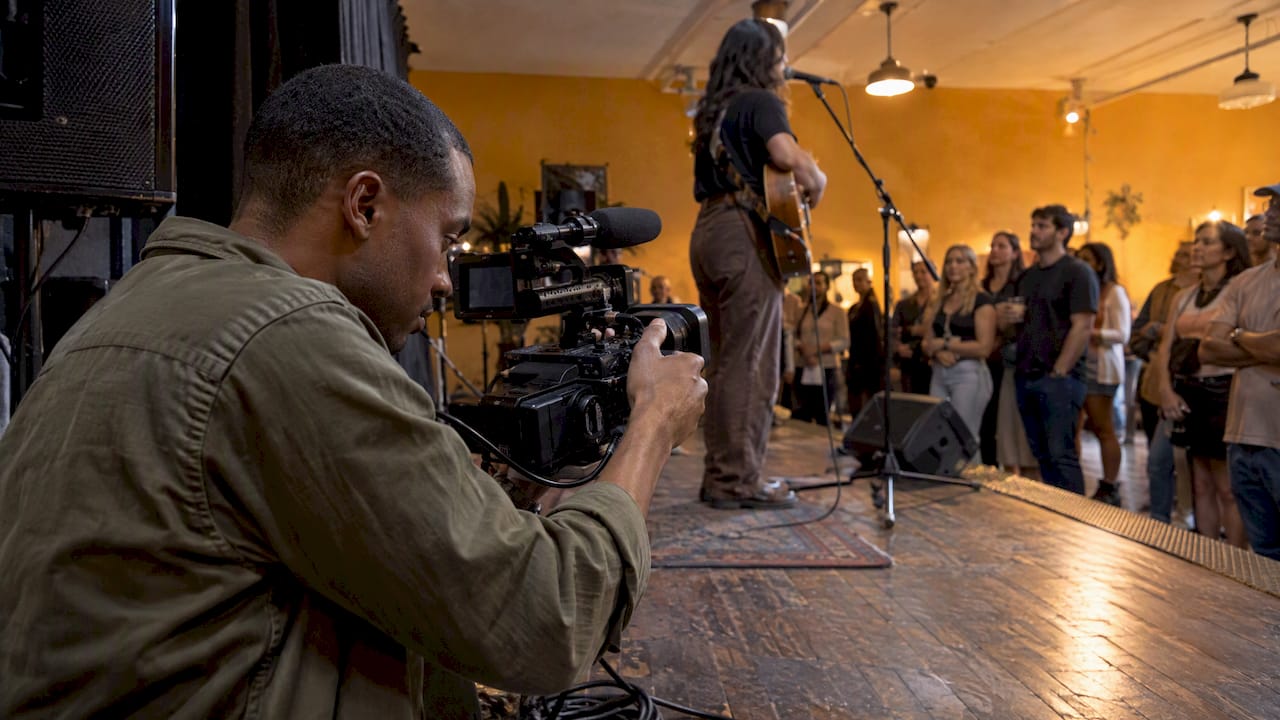
An event recap video is a short edited film, usually one to three minutes, that shows what an event felt like and why it mattered. You make it after the event from footage shot during it. The best ones are planned before doors open, built from more than one point of view, and cut to a single clear purpose. This guide walks through each step, from the definition to the edit to where you post it. It also covers a way to collect the footage a hired crew can't get: what your guests see from their own spots in the room.
TL;DR
- A recap runs about 1 to 3 minutes. A teaser-style sizzle reel runs shorter, and a documentary-style piece runs longer.
- Decide the purpose and audience before the event. That choice tells your editor which footage matters.
- Variety wins: wide shots, speakers, crowd reactions, branding, and short attendee comments.
- Guest phone clips add candid angles. A QR-code camera collects them with no app or account for guests.
- Cut ruthlessly, export a main version plus short vertical clips, and share within days.
Table of Contents
- What an event recap video is (and isn't)
- Why organizers make recap videos
- Plan the recap before the event
- Capture the guests' point of view
- Edit the recap
- Can AI make the recap?
- Share the recap
- Our perspective
- Where guest footage fits by event type
- What it costs to collect guest footage
- A quick checklist for your next recap
- FAQ
- Sources
What an event recap video is (and isn't)
A recap is a short video, typically one to three minutes, that captures the essence of an event through speakers, performers, audience reactions, music, graphics and text. It covers in-person, hybrid and virtual events alike.
It is not a complete record of the agenda. One production team describes it as an edited film of the most important moments from a conference, trade show, corporate gathering or brand activation. If you need every session, that is a different job: full session recordings.
Recap, sizzle reel, highlight video: the differences
People use these words loosely, and vendors draw the lines in slightly different places. A fair summary:
| Format | Typical length | What it does |
|---|---|---|
| Sizzle reel | 15 to 30 seconds | A high-energy social teaser built to grab attention |
| Highlight video | 60 to 90 seconds | Music-driven, focused on how the event felt |
| Recap video | 45 seconds and up, often 1 to 3 minutes | Adds narrative, speeches, interviews and ambient sound so viewers can relive it |
| Documentary-style recap | 3 to 8 minutes | Explains why the event existed, what happened and what impact it had |
One more distinction matters for timing. A promo video comes before the event to drive registration. A recap is made afterward to show success, impact and key takeaways. Same footage can serve both over time, but the job of each is different.
Why organizers make recap videos
The reasons differ by who you are, but they overlap.
Event planners and marketers use recaps to maximize exposure, turn footage into evergreen content for social, websites and newsletters, and encourage sign-ups for the next edition. A recap can also help prove value to stakeholders and reach people who did not attend.
Companies get a second life out of a budget already spent. One event-marketing platform points out that recaps don't need much extra production cost, because the staging and planning are already done.
Couples and hosts do it for a simpler reason: the day goes fast, and a two-minute film of real moments is the thing people rewatch.
Venues and clubs use recaps to show prospective bookers what a night in the room looks like, with real people rather than staged shots.
In each case the viewer should leave knowing three things: what happened, why it mattered, and what to do next time, whether that is attend, follow or book.
Plan the recap before the event
Most weak recaps fail at the planning stage, not the editing stage. An editor is limited by the quality and variety of footage handed over. If nobody filmed the room filling up, the video will not have a room filling up.
Pick one purpose and one audience
Planning should start with a clear purpose, target audience and a list of must-capture moments. A few examples of how that changes the cut:
- Selling next year's tickets: lead with crowd energy, packed rooms and attendee comments.
- Reporting to sponsors: show branding in context, foot traffic and booth interactions.
- Sharing with guests after a wedding: prioritize faces, laughter and unscripted moments over formal coverage.
- Internal culture video: focus on people from different teams mixing, and short quotes about what they took away.
Limit the scope
One production lead advises making tough decisions in pre-production to limit what you capture, rather than trying to film every single session. A useful shot list has 8 to 12 items, not 40.
Build a simple shot list
A mix of wide establishing shots, speaker close-ups, audience reactions and B-roll of branding and networking gives an editor a sense of place, energy and community. Write yours as a checklist:
- Exterior or entrance, plus signage
- Empty room before guests arrive (setup details, centerpieces, stage)
- Doors opening and first arrivals
- Wide shot of the full room at peak attendance
- Speaker or performer close-ups
- Audience reactions: laughter, applause, people leaning in
- Small interactions: handshakes, toasts, hugs, conversations
- Branding, décor, food, drinks, swag
- Short attendee comments, one or two sentences each
- A closing moment: last dance, final applause, people leaving together
If you use several cameras, coordinate with the AV team so angles do not overlap or get blocked.
Capture the guests' point of view
A hired videographer follows the schedule. Guests are everywhere the schedule is not: the hallway, the table nobody is watching, the line for coffee, the dance floor at 11 p.m. Event marketers have noted that organizers can bolster professional footage with attendee-captured content to give a fuller view of the experience.

The usual obstacle is friction. Asking 150 people to download an app, create an account and remember to post with a hashtag gets you a handful of clips and a lot of scattered posts on personal feeds.
How a QR-code camera helps
This is the problem we built Memoryrolls to solve. Guests scan a QR code and get a disposable-camera experience in their phone browser. There is no app to install and no account to create. Each guest gets a limited number of shots, which keeps people shooting with intention instead of filming everything. Photos and short videos from everyone land in one private album that you, the organizer, curate.
For a recap, that gives your editor three things:
- Candid stills and short clips from dozens of vantage points
- A curated pool, so you pick the strongest material instead of sifting through camera rolls
- Bulk download, so the files go straight into your editing project
The shot limit does useful work here. Twenty or so deliberate shots per guest tends to produce better material than unlimited filming, and it nudges people to catch the small moments the pro crew misses. If you run a conference, our conference photo sharing guide shows how one album can pull in material from every room.
Edit the recap
Choose the length
For most events, aim for about 90 seconds to 2 minutes. Vimeo's guidance gives a broader range of one to three minutes. Go longer only if the viewer has a reason to stay, such as sponsors reviewing impact or a documentary-style piece for stakeholders.
Select, don't include
A recap selects representative moments rather than including every activity, and chronology is optional as long as the sequence stays accurate and easy to follow. That permission is useful. You can open on the best moment of the night and then rewind.
Give it a shape
Good post-event video is not a raw recording or a random montage. Structure, pacing, transitions, music and sequencing turn footage into a beginning, middle and end. A workable template for a 90-second cut:
| Segment | Approx. time | Content |
|---|---|---|
| Hook | 0 to 10 sec | The single most energetic or emotional moment |
| Setting | 10 to 25 sec | Venue, wide shots, arrivals |
| Core | 25 to 70 sec | Speakers, performances, interactions, guest clips |
| Voices | 70 to 85 sec | One or two short attendee comments |
| Close | 85 to 90 sec | Final moment, logo or date of the next event |
Use reaction shots and short interviews
Audience reactions such as applause and laughter make an event feel alive. Short attendee interviews add a personal, credible layer. Guest-captured clips fill the same role: a shaky, close-up laugh from someone at the table often reads as more real than a polished wide shot.
Clear permissions
If your recap will be used publicly, tell guests that footage may be used and get releases where your venue, employer or sponsors require them. A private album shared only with attendees is a different case from a public ad. When the video will be used commercially, check with your legal counsel.
Can AI make the recap?
AI tools can handle parts of the work: sorting clips, trimming dead air, adding captions, suggesting a music bed and cutting a vertical version from a longer edit. They work best when you give them good raw material and a clear brief. They cannot decide what mattered at your event, and they cannot film a moment that nobody captured. Treat the output as a first draft and review every cut for accuracy, faces you do not want featured and names spelled correctly. The planning steps above matter more with AI, not less, because the tool can only assemble what you collected.

Share the recap
Event content moves across three timelines: during the event, in the days right after, and as long-term library assets. Your recap belongs in the second window, so aim to publish within days while attendees still remember the event.
- Email: embed the thumbnail with a link to the video, and send it to attendees, sponsors and the people who registered but did not come.
- LinkedIn and your website: the main 90-second to 2-minute cut works well here.
- Instagram and TikTok: shorter vertical clips cut from the main edit.
A helpful way to think about it: treat the footage as a shared resource that can become testimonials, training clips or social ads, not a one-time product.
Our perspective
We see recap videos start with a footage problem, not an editing problem. Planners often spend weeks hunting for usable clips after the event, because the only camera was pointed at the stage. The most memorable moments usually happen off to the side, and the people standing there are your guests.
So our view is simple. Treat guests as a second camera crew, but make it effortless: one scan, no app, no account, a fixed number of shots. Then curate. An organizer who picks the best 40 clips from 300 will cut a better recap than one who tries to chase down files from 50 phones. We also think hosts should keep control: you decide who pays, how many shots each guest gets, and which images reach the shared album.
If you are cutting a recap for a wedding, a conference, a brand activation or a club night, collect guest footage before the day ends, not after. The window to get people to share is short.
— Uday
Where guest footage fits by event type
- Weddings: guests catch the cocktail hour, the table chatter and the late-night dance floor. See our page on a QR code disposable camera for weddings.
- Conferences and off-sites: guest clips from breakouts and hallways round out the main-stage footage. Our page on event photo sharing for conferences covers the setup, and our post on corporate event engagement ideas has ways to get people participating.
- Brand activations: custom branding on the camera experience keeps the recap on message. Read about a branded disposable camera for activations.
- Bars, clubs and venues: candid nights make the best material for showing what a venue is like. See camera options for venues and nightlife.
- Races and fitness events: finish-line faces and group shots at the start line add human moments to a drone-and-course edit. See photos for races and fitness events.
- Campus groups: see our page for college events and Greek life.
What it costs to collect guest footage
Event Camera is pay-per-event, with no subscription. The first five guests are free. Pricing after that depends on how many seats you set up, and the per-seat rates are published on our pricing page:
| Seats | One-off price per seat |
|---|---|
| 1 to 5 | Free |
| 6 to 25 | $1 |
| 26 to 100 | 40¢ |
| 101 to 250 | 30¢ |
| 251 and up | 20¢ |
If you would rather not foot the bill, you can set the event to guest-paid, at $1.99 per person, one-off. Guest codes are $1 per seat. Photos are kept for 90 days, so download the files you need for your edit well before then. To start collecting clips for your own recap, set up an Event Camera.
A quick checklist for your next recap
- Write the purpose and audience in one sentence.
- Make a 10-item shot list and share it with your videographer.
- Set up a guest camera and put the QR code on tables, signage or programs.
- Capture one or two short comments from attendees.
- Curate the album the next morning and download the best files.
- Cut a 90-second main version, then vertical clips.
- Publish within days, then send to attendees, sponsors and no-shows.
FAQ
How long should an event recap video be?
Most run one to three minutes. For social and email, 90 seconds to 2 minutes is a strong target. Shorter teasers of 15 to 30 seconds are a separate format, and documentary-style pieces can reach several minutes.
What do you call a video made after an event?
The common names are event recap video, highlight video, wrap-up video and aftermovie. Recap tends to mean a version with some narrative and context. Highlight or sizzle usually means a faster, music-led cut.
Do I need a professional videographer?
Not always. For a wedding, a club night or a small corporate event, a mix of your own footage and guest clips can produce a good recap. For a large conference or a sponsor-facing video, a pro crew gives you stage audio and clean wide shots, and guest clips add candid angles on top.
How do I get guests to share their photos and videos?
Remove steps. Guests scan one QR code, with no app and no account, and take a limited number of shots that go into one album. Put the code where people already look, such as table cards, signage or the program, and mention it from the stage.
Sources
- What Makes an Event Recap Video Great?
- Event Sizzle Reels vs. Recap Videos
- Corporate Event Video: How to Capture Your Conference
- How to Master the Event Recap or Conference Wrap Up Video
- Event Promo Video vs Event Recap Video
- Event Recap Video Examples: 6 B2B Videos and Why They Work
- LA Event Recap Video Strategy for Marketing Teams
- Show 'Em What They Missed: The Power of Event Recap Videos
- Learn How To Create An Event Recap Video
- Corporate event recap video
- Event Video Production Guide
- Event Video Examples: 12 Ideas and Expert Promo Tips
- What Is Event Video Storytelling and Why It Matters
- How to Make an Event Recap Video That Represents the Event
- What is a recap video, and is it enough?