 Memory Rolls
Digital Disposable Camera: 3 Types and How to Choose
A digital disposable camera can mean a reusable gadget or a QR-code camera on guests' phones. Compare cost, effort and results to pick the right one.
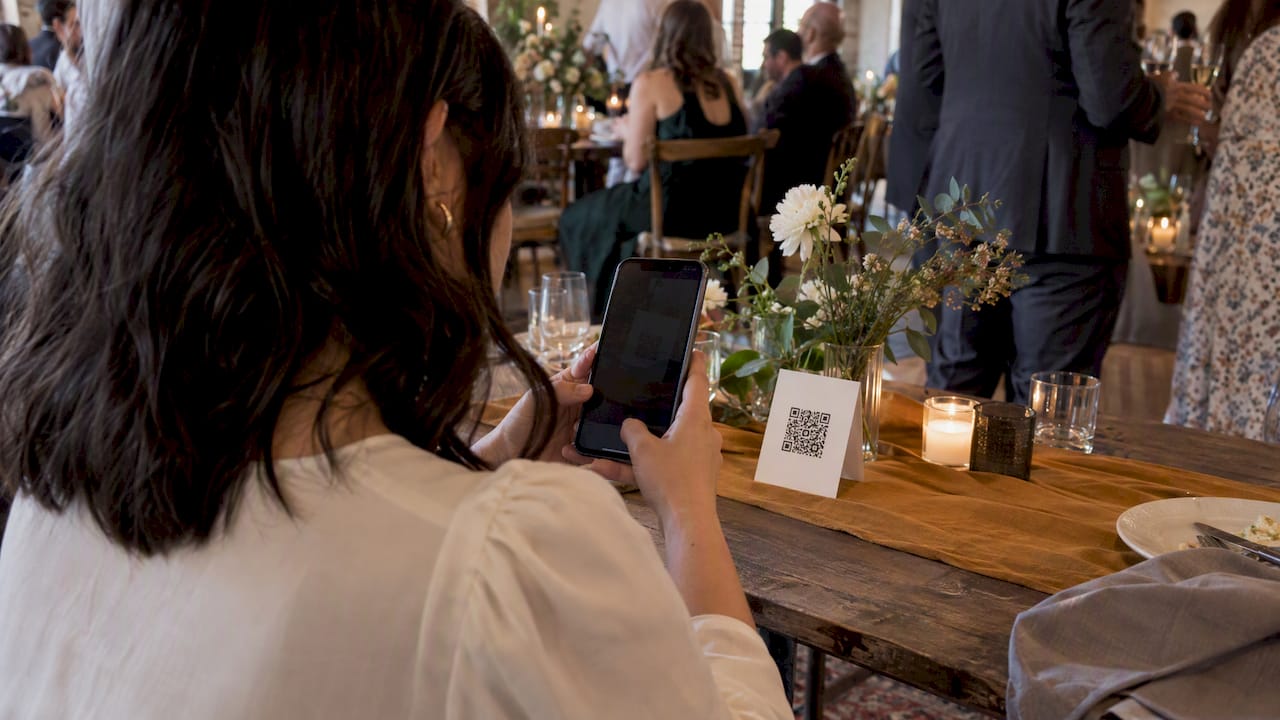
A "digital disposable camera" can mean three different things: a reusable retro-style gadget, a camera app, or a QR code that turns every guest's phone into a one-time-use camera. For a party, wedding or company event, the QR code option is usually the easiest. Nobody has to buy hardware, collect cameras or wait for film to be developed. For a personal hobby camera, the gadget wins.
This guide explains what each type does, what it costs, and how to match it to your event.
TL;DR
- Film disposables give you a real analog look, but you wait days for processing and only see the photos after the event. At CVS, processing takes 7 to 10 days.
- Reusable digital cameras with a film look are one person's gadget, not an event solution. One popular model is $119 at B&H and holds 27 exposures per the listing.
- A QR-code camera runs in guests' phones with no app or account. Each guest gets a limited number of shots, and the host curates one shared album.
- Memoryrolls Event Camera is free for the first five guests. After that, pricing is one-off and per seat, with no subscription.
- Photos stay available for 90 days, so download what you want to keep.
Table of Contents
- What people mean by a digital disposable camera
- The three options compared
- Digital disposable camera app vs QR code: what changes for guests
- How a QR disposable camera works at a real event
- Who a digital disposable camera suits
- What it costs
- A fair way to choose
- Our perspective
- Try it at your next event
- FAQ
- Sources
What people mean by a digital disposable camera
Search results for this phrase are a mix. Some pages sell small screen-free cameras that imitate film cameras. Others are shops for real film disposables. A few are about apps. The reader intent splits in two:
- "I want a camera for myself." You like the look and the no-screen discipline of a disposable, but you don't want to pay for film and developing each time.
- "I want my guests to take photos at my event." You want candid pictures from every table, not only the ones the photographer or your own phone caught.
The two goals need different tools. Mixing them up is how people end up with a $119 gadget they can hand to only one guest at a time.
The three options compared
Option 1: classic film disposable cameras
The original. A plastic body, a roll of film, a flash. Guests shoot, you collect the cameras, and a lab develops them. Wirecutter tests and ranks single-use film cameras, which tells you the format is still very much alive.
What it does well: a real analog look, a tactile click, and a printed result.
Where it falls short for events:
- Delay. Pharmacies like CVS state that processing a disposable camera takes 7 to 10 days. You see nothing the night of the event.
- Logistics. You buy the cameras, place them on tables, and chase them down at the end of the night. Cameras that walk out in a guest's bag mean photos you never see.
- Coverage. One camera has one roll. Ten tables with a camera each is ten tables. Guests who never touch a camera leave no record.
- Digital copies. Prints are the main product. Scans are available when you ask at development, but they add a step.
Option 2: reusable digital cameras that look like disposables
This is a newer category: digital hardware designed to feel like a single-use camera. No screen, fixed focus, a built-in flash, USB-C charging. The ONE35 V2 listing at B&H shows the typical shape: a 13MP sensor, 27 exposures, and photos transferred to a phone wirelessly or by cable, priced at $119.00 when we checked.
What it does well: you own it, you can reuse it forever, and there is no film or developing cost. For travel, a weekend with friends, or a personal photo habit, it is a charming option.
Where it falls short for events:
- One device, one photographer. Buying a dozen to spread across tables gets expensive fast, and you still have to get each one back.
- Manual transfer. Every camera has to be connected to a phone or computer, and the photos merged into one place.
- Shot limit. With 27 exposures on that model, a single camera covers a small slice of a crowd.
If you want a keepsake to carry, this is the right category. If you want a hundred guests' perspectives, you need something that already lives in their pockets.
Option 3: a QR-code camera on guests' phones
This is the version that fits the "digital disposable camera" idea most literally. Guests scan a QR code and a camera opens on their own phone. They get a fixed number of shots, like a roll of film, and the photos drop into a private album the organizer controls.
This is the category we build in. Guests don't download an app or create an account, and that one detail decides whether a guest actually uses it at 9 p.m. when the dance floor opens.
What it does well: instant collection, no hardware, scales from a dinner for 8 to an event for hundreds, and the host sees the album as photos come in.

Where it is not a fit: if your heart is set on the grain and unpredictability of real film, or you want physical prints in guests' hands the same evening, a film camera or a printing station is the better call. Many hosts mix: a couple of film cameras on the head table, a QR code for everyone else. We compare that setup in detail in disposable cameras for wedding tables vs a camera on guests' phones.
Side-by-side
| Film disposable | Reusable retro digital | QR-code phone camera | |
|---|---|---|---|
| Hardware to buy | Yes, per camera | Yes, per camera | None |
| Guests need an app | No | No (host may use one to transfer) | No app, no account |
| Seeing photos | After lab processing, 7 to 10 days at CVS | After you transfer them | Collected into one album |
| Coverage of a crowd | One roll per camera | One device per photographer | Every guest with a phone |
| Photos lost if camera disappears | Yes | Yes | No, photos upload as taken |
| Best for | Analog fans, small tables | Personal use, travel | Weddings, corporate events, parties |
Digital disposable camera app vs QR code: what changes for guests
People often search for a "disposable camera app," and an app is the obvious idea. For a personal project it is fine. For an event it adds friction at the worst moment. Guests have to find the app store, wait for a download, sometimes sign up, and then remember it exists. Every step loses people.
A QR code skips all of that. The phone's own camera reads the code, a page opens, and the guest is shooting. That is why we built Event Camera around no app and no account. The people who join in are the ones who would never have installed anything.
How a QR disposable camera works at a real event
Here is the typical flow with Event Camera:
- Set up the event. You create the event, choose how many shots each guest gets, and add your branding if you want it.
- Print or share the QR code. Table cards, a sign at the bar, a line on the invitation, or a screen at the entrance all work.
- Guests scan and shoot. Each guest gets a limited number of photos and short videos. The limit is the point: it makes people pick their moments, like a roll of film.
- Curate. You choose the best shots for the shared album, so everyone sees the highlights rather than 400 near-duplicates.
- Download and share. Photos are stored for 90 days, and you can bulk-download them. Put the date in your calendar so nothing is lost.
If you are planning a wedding specifically, our wedding page walks through the setup, and how to collect photos from wedding guests compares six ways to do it. To turn everyone's shots into a single keepsake, see how to make one album from all your guests' photos.
Who a digital disposable camera suits
The format works wherever guests are already holding phones and you want the unposed version of the night.
- Weddings. Dozens of guests see moments the photographer is not standing next to.
- Corporate events. Candid shots from off-sites and conferences, without chasing people for photos afterward. See event photo sharing for off-sites and conferences. For seasonal parties, our company holiday party photo ideas help.
- Brand activations. A branded camera experience turns attendees into content creators. More on branded disposable cameras for brand activations.
- Venues, bars and clubs. Guests get a reason to share the night, and the venue gets content. See the setup for bars, clubs and venues.
- Campus groups. Greek life and student events, with a page built for college events.
- Parties and weekends. Our bachelorette party photo ideas show how a shot limit changes what people capture. For more, browse 40+ events where guest photos shine.
What it costs
Film disposables are paid per camera, then per roll developed. A reusable digital camera is a one-time hardware purchase, such as the $119.00 listing above. QR-code cameras are priced by the number of people taking part.
Event Camera has no subscription and no monthly fee. You pay once for each event. The rates published on our pricing page are:
| Seats | One-off price per seat |
|---|---|
| 1 to 5 | Free |
| 6 to 25 | $1 |
| 26 to 100 | $0.40 |
| 101 to 250 | $0.30 |
| 251 and up | $0.20 |
| Guest codes | $1 |
| Guest-paid event seat | $1.99 per person |
Two things to notice. First, the price per seat falls as your guest list grows, so a large event costs far less per person than a small one. Second, you choose who pays. As host, you cover the seats. Or you set the event to guest-paid, where each person who joins pays $1.99. That suits a bachelorette weekend or a club night where the host would rather not foot the bill. Check the pricing page for the exact total on your guest count before you commit.
A fair way to choose
Ask yourself four questions:
- Do you want the photos during the event or weeks later? Same night points to QR. A slow, tactile reveal points to film.
- How many people will shoot? Under five, any option works. Past 20, hardware gets unwieldy.
- Who handles collection? If you don't want to chase cameras, avoid anything physical.
- Does the look matter more than coverage? If you love grain, shoot film for yourself and let a QR camera cover the room.
Our perspective
We built Event Camera after seeing the same problem at event after event. People love the idea of disposable cameras on tables, then lose half of them, wait weeks for the prints, and discover the best moments were at the table that never got a camera.

We think the magic of a disposable camera was never the plastic. It was the limit. A fixed number of shots makes people look up, choose a moment and shoot it. So we kept the limit and removed everything else: the hardware, the download, the account, the wait. Every guest sees the same simple screen, and the organizer decides which shots end up in the shared album.
We also believe the host should control the money and the privacy. That is why you can pay for everyone, or let guests pay for themselves, and why the album stays private and curated rather than an open feed. And we are honest about the tradeoff: if you want true film grain, shoot film. For capturing a room full of people, a phone in every pocket is simply more cameras than any host can buy.
— Uday
Try it at your next event
Event Camera is free for the first five guests, so you can test the whole flow, from scanning the code to the curated album, before you invite a crowd. When you are ready to scale up, see the full pricing or start from the Event Camera home page.
FAQ
Can you get a digital disposable camera?
Yes, in two forms. Reusable cameras styled like disposables are sold as hardware, for example a 27-exposure model at B&H. For events, a QR-code camera turns guests' own phones into single-use cameras with no extra device.
Is a disposable camera the same as a digital camera?
Not usually. A classic disposable holds film that must be developed at a lab, while a digital camera stores photos on a memory card or internal storage. A digital disposable camera borrows the look and the shot limit of the first, with the instant files of the second.
How do you get the pictures from a disposable camera?
For film, you drop the camera at a lab or pharmacy. CVS says processing takes 7 to 10 days. With a QR-code camera, the photos go straight into the shared album, and you can bulk-download them within 90 days.
Do guests need to download an app or make an account?
No. With Event Camera, guests scan the QR code with their phone's camera and start shooting in the browser. That is the main reason more guests join in.
Is a QR disposable camera better than a photo booth?
They do different jobs. A booth gives posed, printed group shots at one spot, but it needs space and a queue. A QR camera captures candid moments anywhere in the venue, and many hosts use both.
Sources
- CVS Pharmacy, Flower Mound, TX: photo developing times
- B&H Photo Video: ONE35 V2 camera listing
- Wirecutter: The 3 Best Disposable Cameras